分隔符和定长解码器的应用

通过使用DelimiterBasedFrameDecoder、FixedLengthFrameDecoder实现分隔符和定长解码器。

TCP以流的方式进行数据传输,上层的应用协议为了对消息进行分区,往往采用下面4种方式:

  • 消息长度固定,累计读取到长度总和为定长LEN的报文后,就以为读取到了一个完整的消息;将计数器置位,重新开始读取下一个数据报;
  • 将回车换行符作为消息结束符,例如FTP协议,这种方式在文本协议中应用比较广泛;
  • 将特殊的分隔符作为消息的结束标志,回车换行符就是一种特殊的结束分隔符;
  • 通过在消息头中定义长度字段来标识消息的总长度。

DelimiterBasedFrameDecoder应用开发

通过对DelimiterBasedFrameDecoder的使用,我们可以自动完成以分隔符作为码流结束标识的消息的解码;通过一个实例来演示,EchoServer接受到EchoClient的请求 消息后,将其打印出来,然后将原始消息返回给客户端,消息以”$_”作为分隔符。

服务端开发

代码清单1 EchoServer服务端EchoServer

1
2
3
4
5
6
7
8
9
10
11
12
13
14
15
16
17
18
19
20
21
22
23
24
25
26
27
28
29
30
31
32
33
34
35
36
37
38
39
40
41
42
43
44
45
46
47
48
49
50
public class EchoServer {
public void bind(int port)throws Exception{
//创建服务端的NIO线程组
EventLoopGroup bossGroup=new NioEventLoopGroup();
EventLoopGroup workerGroup=new NioEventLoopGroup();
try {
ServerBootstrap b=new ServerBootstrap();
b.group(bossGroup,workerGroup)
.channel(NioServerSocketChannel.class).option(ChannelOption.SO_BACKLOG, 100)
.childHandler(new LoggingHandler(LogLevel.INFO))
.childHandler(new ChannelInitializer<SocketChannel>() {
@Override
protected void initChannel(SocketChannel ch) throws Exception {
// TODO Auto-generated method stub
//首先创建分隔符缓冲对象ByteBuf,本例中使用“$_”作为分隔符。
ByteBuf delimiter=Unpooled.copiedBuffer("$_".getBytes());
/* 创建DelimiterBasedFrameDecoder对象,将其加入到ChannelPipeline中。
DelimiterBasedFrameDecoder有多个构造方法,这里我们传递两个参数:
第一个1024表示单条消息的最大长度,当达到该长度任然没有查到分隔符,就抛出TooLongFrameException异常,
防止由于异常码流缺失分隔符导致的内存溢出,这是Netty解码器的可靠性保护;第二个就是分隔符缓冲对象。*/
ch.pipeline().addLast(new DelimiterBasedFrameDecoder(1024, delimiter));
ch.pipeline().addLast(new StringDecoder());
ch.pipeline().addLast(new EchoServerHander());
}
});
//绑定端口,同步等待成功
ChannelFuture f=b.bind(port).sync();
//等待服务端监听端口关闭
f.channel().closeFuture().sync();
} finally {
bossGroup.shutdownGracefully();
workerGroup.shutdownGracefully();
}
}
public static void main(String[] args) throws Exception {
// TODO Auto-generated method stub
int port=8080;
if(args!=null&&args.length>0){
try {
port=Integer.valueOf(args[0]);
} catch (NumberFormatException e) {
// TODO: handle exception
}
}
new EchoServer().bind(port);
}
}

代码清单2 EchoServer服务端EchoServerHandler

1
2
3
4
5
6
7
8
9
10
11
12
13
14
15
16
17
18
19
20
21
@Sharable
public class EchoServerHander extends ChannelHandlerAdapter {
int counter=0;
@Override
public void channelRead(ChannelHandlerContext ctx,Object msg)throws Exception{
/* 直接将接受的消息打印出来,由于DelimiterBasedFrameDecoder自动对请求消息进行解码,
后续的ChannelHandler接受到的msg对象就是个完整的消息包;
第二个ChannelHandler是StringDecoder,它将ByteBuf解码器成字节符对象;
第三个EchoServerHandler接受到的msg消息就是解码后的字符串对象。*/
String body=(String) msg;
System.out.println("This is "+ ++counter+" times receive client :["+body+"]");
ByteBuf echo=Unpooled.copiedBuffer(body.getBytes());
ctx.writeAndFlush(echo);
}
@Override
public void exceptionCaught(ChannelHandlerContext ctx, Throwable cause) throws Exception {
cause.printStackTrace();
ctx.close();
}
}

由于我们设置DelimiterBasedFrameDecoder过滤掉了分隔符,所以,返回给客户端是需要在请求消息尾部拼接分隔符“$_”,最后创建ByteBuf,将原始消息重新返回给客户端。

客户端开发

代码清单3 EchoServer客户端EchoClient

1
2
3
4
5
6
7
8
9
10
11
12
13
14
15
16
17
18
19
20
21
22
23
24
25
26
27
28
29
30
31
32
33
34
35
36
37
38
39
40
41
42
43
44
45
public class EchoClient {
public void connect(int port, String host) throws Exception {
// 配置客户端NIO线程组、
EventLoopGroup group = new NioEventLoopGroup();
try {
Bootstrap b = new Bootstrap();
b.group(group).channel(NioSocketChannel.class).option(ChannelOption.TCP_NODELAY, true)
.handler(new ChannelInitializer<SocketChannel>() {
@Override
protected void initChannel(SocketChannel ch) throws Exception {
/*
与 服务端类似,分别DelimiterBasedFrameDecoder和StringDecoder
添加到客户端ChannelPipeline中,最后添加客户端I/O事件处理类EchoClientHandler。
*/
ByteBuf delimiter = Unpooled.copiedBuffer("$_".getBytes());
ch.pipeline().addLast(new DelimiterBasedFrameDecoder(1024, delimiter));
ch.pipeline().addLast(new StringDecoder());
ch.pipeline().addLast(new EchoClientHandler());
}
});
// 发起异步连接操作
ChannelFuture f = b.connect(host,port).sync();
// 等待客户端链路关闭
f.channel().closeFuture().sync();
} finally {
group.shutdownGracefully();
}
}
public static void main(String[] args) throws Exception {
int port = 8080;
if (args != null && args.length > 0) {
try {
port = Integer.valueOf(args[0]);
} catch (NumberFormatException e) {
// TODO: handle exception
}
}
new EchoClient().connect(port, "127.0.0.1");
}
}

代码清单4 EchoClient客户端EchoClientHandler

1
2
3
4
5
6
7
8
9
10
11
12
13
14
15
16
17
18
19
20
21
22
23
24
25
26
27
28
29
30
31
32
33
34
35
36
public class EchoClientHandler extends ChannelHandlerAdapter{
private int counter;
static final String ECHO_REQ = "Hi,Lilinfeng.Welcome to netty.$_";
public EchoClientHandler() {
// TODO Auto-generated constructor stub
}
@Override
public void channelActive(ChannelHandlerContext ctx) throws Exception {
//循环发送给服务端
for (int i = 0; i < 10; i++) {
ctx.writeAndFlush(Unpooled.copiedBuffer(ECHO_REQ.getBytes()));
}
}
@Override
public void channelRead(ChannelHandlerContext ctx, Object msg)
throws Exception {
//打印接收到服务端应答消息同时进行计数
System.out.println("This is " + ++counter + " times receive server : ["
+ msg + "]");
}
@Override
public void channelReadComplete(ChannelHandlerContext ctx) throws Exception {
ctx.flush();
}
@Override
public void exceptionCaught(ChannelHandlerContext ctx, Throwable cause) throws Exception {
cause.printStackTrace();
ctx.close();
}
}

服务端与客户端运行

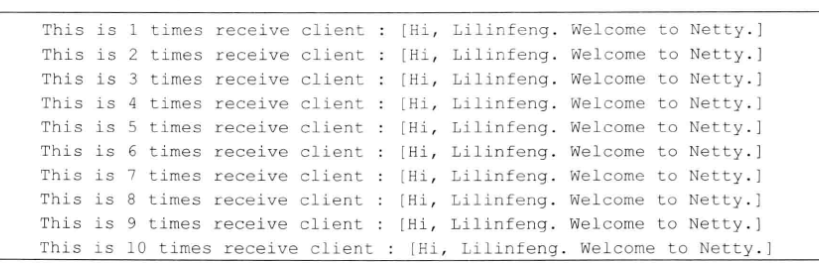
服务端运行结果如下。


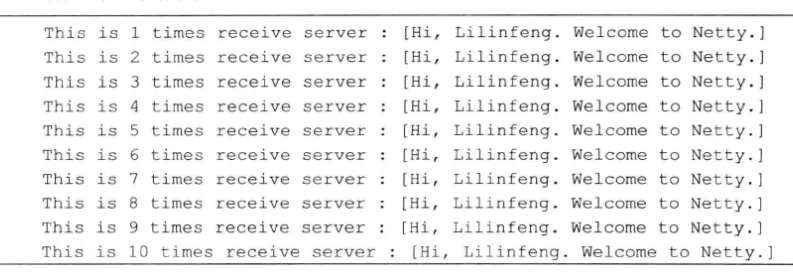
客户端运行结果如下。


测试表明DelimiterBasedFrameDecoder可以自动对采用分隔符做码流结束标识的消息进行解码。

DelimiterBasedFrameDecoder没有解码器处理

对服务端的DelimiterBasedFrameDecoder注释掉,代码如图1所示。
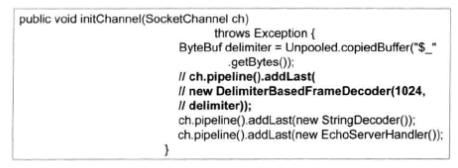


图1 删掉DelimiterBasedFrameDecoder后的服务端代码

服务端运行结果如下:


FixedLengthFrameDecoder应用开发

FixedLengthFrameDecoder是固定长度解码器,它能够按照指定长度对消息进行自动解码,开发者不需要考虑TCP的粘包/拆包问题,非常实用。

服务端开发

在服务端的ChannelPipeline中新增FixedLengthFrameDecoder,长度设置为20,然后再依次增加字符串解码器和EchoServerHandler。
代码清单5 EchoServer服务端 EchoServer

1
2
3
4
5
6
7
8
9
10
11
12
13
14
15
16
17
18
19
20
21
22
23
24
25
26
27
28
29
30
31
32
33
34
35
36
37
38
39
40
41
42
43
44
45
46
47
48
49
50
51
public class EchoServer {
public void bind(int port) throws Exception {
// 配置服务端的NIO线程组
EventLoopGroup bossGroup = new NioEventLoopGroup();
EventLoopGroup workerGroup = new NioEventLoopGroup();
try {
ServerBootstrap b = new ServerBootstrap();
b.group(bossGroup, workerGroup)
.channel(NioServerSocketChannel.class)
.option(ChannelOption.SO_BACKLOG, 100)
.handler(new LoggingHandler(LogLevel.INFO))
.childHandler(new ChildChannelHandler());
// 绑定端口,同步等待成功
ChannelFuture f = b.bind(port).sync();
// 等待服务端监听端口关闭
f.channel().closeFuture().sync();
} finally {
// 优雅退出,释放线程池资源
bossGroup.shutdownGracefully();
workerGroup.shutdownGracefully();
}
}
private class ChildChannelHandler extends ChannelInitializer<SocketChannel> {
@Override
protected void initChannel(SocketChannel arg0) throws Exception {
arg0.pipeline().addLast(new FixedLengthFrameDecoder(20));
arg0.pipeline().addLast(new StringDecoder());
arg0.pipeline().addLast(new EchoServerHandler());
}
}
/**
* @param args
* @throws Exception
*/
public static void main(String[] args) throws Exception {
int port = 8080;
if (args != null && args.length > 0) {
try {
port = Integer.valueOf(args[0]);
} catch (NumberFormatException e) {
// 采用默认值
}
}
new EchoServer().bind(port);
}
}

代码清单6 EchoServer服务端 EchoServerHandler

1
2
3
4
5
6
7
8
9
10
11
12
13
14
15
16
17
@Sharable
public class EchoServerHandler extends ChannelHandlerAdapter {
@Override
public void channelRead(ChannelHandlerContext ctx, Object msg) throws Exception {
System.out.println("Receive client : ["+msg+"]");
}
@Override
public void exceptionCaught(ChannelHandlerContext ctx, Throwable cause) throws Exception {
cause.printStackTrace();
ctx.close();
}
}

利用FixedLengthFrameDecoder解码器,无论一次接收多少数据报,它都会按照构造函数中设置的固定长度进行解码,如果是半包消息,FixedLengthFrameDecoder会缓存半包消息并等待下个包到达后进行拼包,直到一个完整的包。

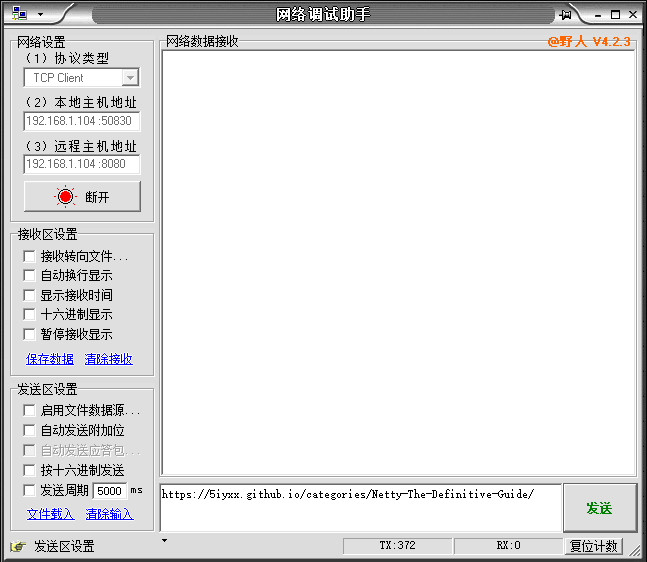
利用NetAssist软件测试服务端

如图2所示,通过NetAssist软件,发送消息到服务端,消息内容为:https://5iyxx.github.io/categories/Netty-The-Definitive-Guide/


图2 NetAssist软件参数

EchoServer服务端运行结果如图3所示,FixedLengthFrameDecoder解码器按照20个字节对请求进行截取。



图3 EchoServer服务端运行结果

Adhere to the original technology to share, your support will encourage me to continue to create!